All commercial acknowledgments of received documents must be managed exclusively from Inbox.
Quick Guide to the Process
2. Select the documents you wish to take action on.
3. Open the Options (Opciones) menu and locate the Commercial Acknowledgment (Acuse Comercial) option.
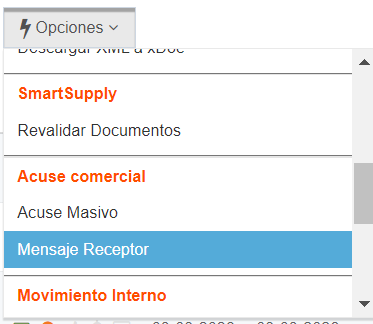
4. Check the Receiver Message (Mensaje Receptor) box and fill in the required information.
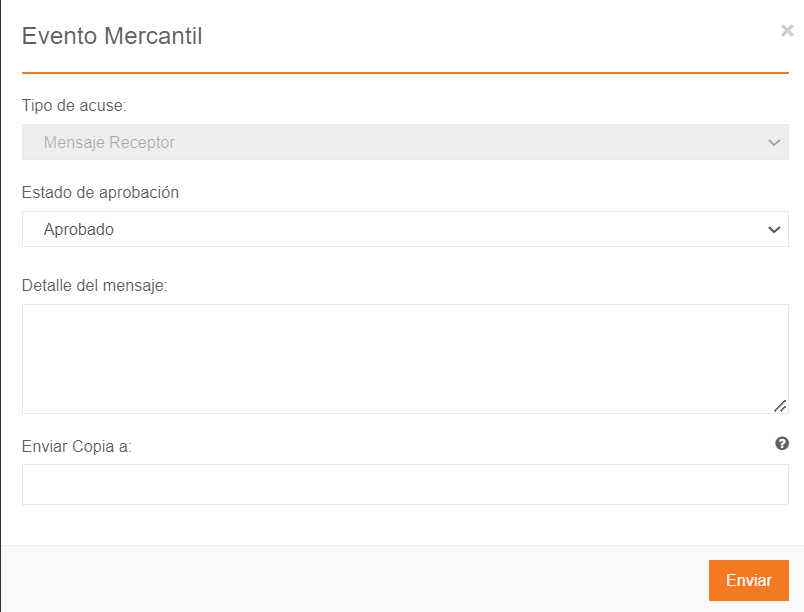
6. Once automation is applied, the status of the documents will update automatically as needed.
You can find the detailed instructions for this process here: Document Receipt Guide
Was this article helpful?
That’s Great!
Thank you for your feedback
Sorry! We couldn't be helpful
Thank you for your feedback
Feedback sent
We appreciate your effort and will try to fix the article


