Procedure for updating Tax Entity credentials (MH) in the Gosocket Portal
If you need to update the credentials of the Tax Entity (Ministry of Finance – MH) in the Gosocket portal, or if you are experiencing the rejection CR005: “The token could not be obtained from the Ministry of Finance” (No se pudo obtener el token por parte del Ministerio de Hacienda), it will be necessary to update your TRIBU credentials.
Below are the detailed instructions to complete this process correctly.

If you are an administrator user in the billing portal (portal Gosocket) and need to update the TRIBU (MH) Costa Rica certificate credentials in the Gosocket platform, please follow the steps below:
- Log in to the billing portal at gosocket.net using your administrator credentials.
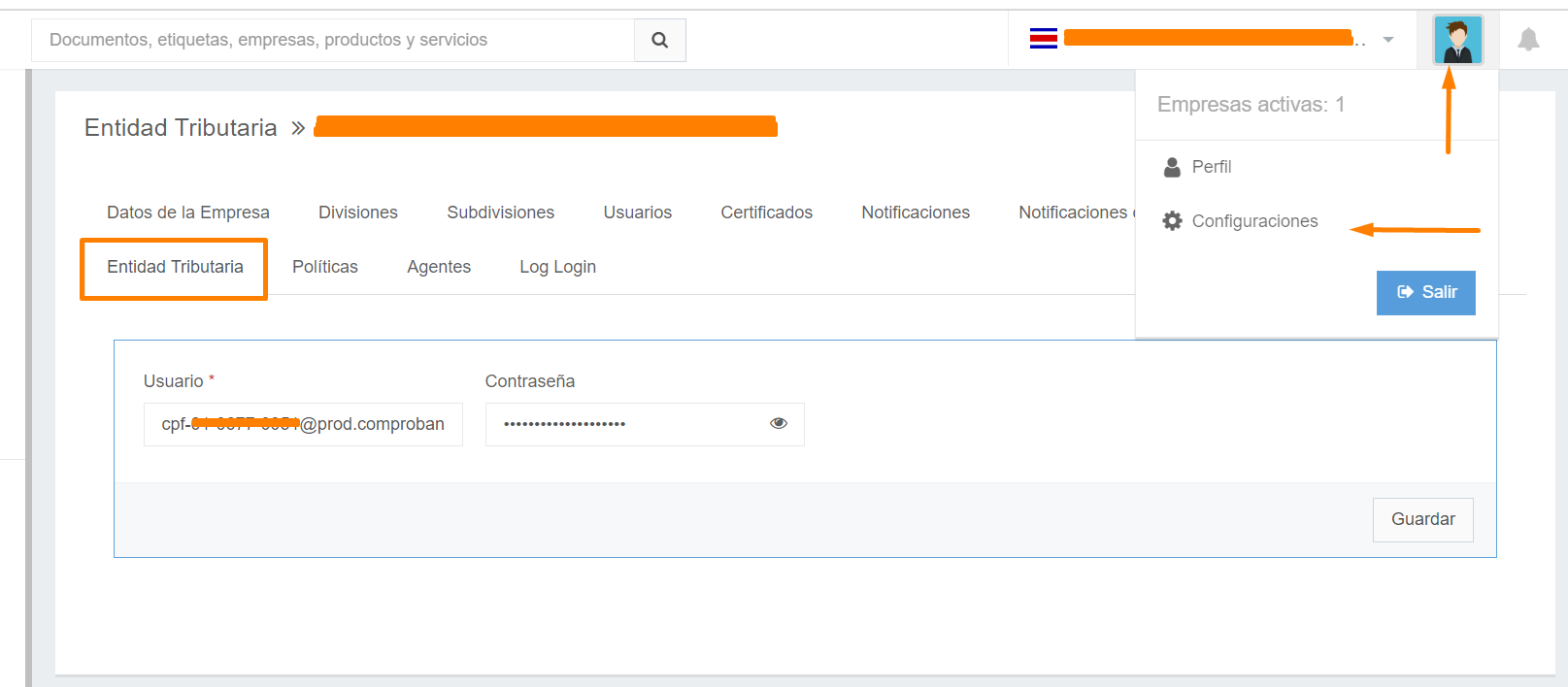
- Once inside, click on the user icon located in the upper-right corner of the screen.
- In the dropdown menu, select “Settings.” (Configuraciones)
- Navigate to the Tax Entity (Entidad Tributaria) tab within the settings section.
- Update the corresponding username and password (Usuario y contraseña) fields according to the new credentials issued by TRIBU.
Important Recommendation
Keeping your credentials updated ensures the proper functioning of the portal and prevents interruptions in the electronic invoicing process.
Timely updates help avoid rejections from the Ministry of Finance and ensure continuity in your electronic fiscal operations.
Important Note
If any documents were previously shown with the status “Unauthorized Credentials” (Credenciales No Autorizadas) and you have already updated your credentials, the system will automatically run a process to recheck those documents using the newly updated information.
¿Need Assistance?
If you experience any questions or difficulties during the process, the technical support team is available to assist you. They are always committed to providing you with the best experience and ensuring the correct use of our electronic invoicing platform.
Thank you for trusting Gosocket.
Was this article helpful?
That’s Great!
Thank you for your feedback
Sorry! We couldn't be helpful
Thank you for your feedback
Feedback sent
We appreciate your effort and will try to fix the article


